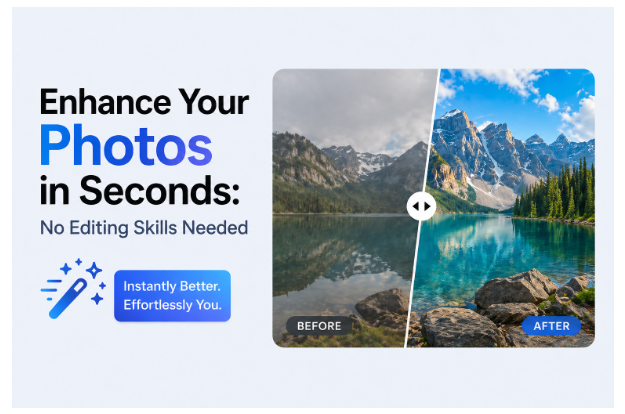
In today’s digital world, image quality matters more than ever. Whether you’re posting on social media, running an online store, or sharing personal memories, high-quality visuals play a major role in grabbing attention and making a strong impression. Blurry, pixelated, or poorly lit images can easily be overlooked, while sharp and vibrant photos stand out instantly.
The good news is that improving your images is no longer limited to professional photographers or graphic designers. Thanks to modern AI-powered tools, anyone can enhance photo quality in just a few clicks—no editing experience required. If you’ve ever wondered how to enhance a blurry photo or improve clarity without spending hours learning complex software, this guide will walk you through everything you need to know.
Part 1. What Is Image Enhancement?
Image enhancement refers to the process of improving the overall quality of a photo by correcting common visual issues. Unlike creative editing, which changes the artistic look of an image, enhancement focuses on making the original image clearer, sharper, and more visually appealing.
Common Problems Image Enhancement Fixes:
- Slight blur or lack of focus
- Low resolution and pixelation
- Noise or graininess
- Poor lighting, dull colors, or low contrast
When you enhance photo quality, you’re essentially refining the image so it looks closer to how it should have appeared originally.
Key Concepts to Know
Editing vs. Enhancement
Editing involves adding filters, effects, or stylistic changes. Enhancement, on the other hand, improves the technical quality—like sharpness and clarity—without altering the original intent.
Manual vs. AI Enhancement
Traditional editing requires hands-on adjustments and technical knowledge. AI-powered tools, however, automate the process. With just one click, they analyze and improve your image, making it much easier for beginners to enhance photo quality online or offline.
Modern tools have made high-quality image improvement accessible to everyone, regardless of skill level.
Part 2. Why Adobe Photoshop Can Be Challenging for Beginners
While Adobe Photoshop is one of the most powerful image editing tools available, it isn’t always the best choice for beginners.
Here’s why:
- Complex Interface: Photoshop includes a wide range of tools and panels that can overwhelm new users.
- Steep Learning Curve: Learning how to use layers, masks, and advanced adjustments takes time.
- Time-Consuming: Even simple enhancements can require multiple steps.
- Not Ideal for Quick Fixes: If you just want to fix a blurry photo or improve lighting, Photoshop can feel excessive.
Although Photoshop is excellent for professionals, it’s not the most efficient option for users looking for a quick and simple way to enhance photo quality.
Part 3. Simple Ways to Enhance Images Without Photoshop
Method 1: Online Image Enhancement Tools
Online tools are one of the easiest ways to enhance photo quality online. They work directly in your browser, so there’s no need to install software.
Pros:
- Fast and convenient
- Accessible from any device
- Beginner-friendly
Cons:
- Limited customization
- May reduce output quality
- Requires internet connection
These tools are great for quick fixes but may not deliver professional-level results.
Method 2: Built-In Editing Tools (Mobile & Desktop)
Most smartphones and computers come with basic editing features that allow you to adjust brightness, contrast, and sharpness.
Pros:
- Easy to use
- No additional downloads required
- Good for simple edits
Cons:
- Limited functionality
- Cannot fully restore detail or resolution
- Not effective for heavily blurred images
While useful, these tools often fall short when trying to figure out how to enhance a blurry photo with significant quality loss.
Method 3: AI Image Enhancers (Recommended)
AI-powered tools are currently the most effective way to enhance photo quality. They use advanced algorithms to automatically detect and fix issues in your images.
Benefits:
- Improve sharpness and clarity
- Restore lost details
- Reduce noise and grain
- Enhance colors and contrast
- Deliver high-quality results with minimal effort
If you’re looking for the easiest and most reliable way to enhance photo quality, AI tools are the best choice.
Part 4. Enhance Images Easily with Leawo Image Enhancer
4.1 Overview
One excellent example of an AI-powered solution is Leawo Photo Enhancer. This desktop software is designed to simplify the process of improving image quality.
It uses intelligent algorithms to upscale images, sharpen details, and automatically correct imperfections. Whether you’re working with low-resolution photos or trying to fix blur, it provides a fast and effective solution.
Another helpful tool worth mentioning is Leawo PhotoIns, which focuses on AI-driven photo enhancement and background processing.
4.2 Beginner-Friendly Features
Leawo Image Enhancer stands out because of its simplicity and accessibility:
- AI-powered enhancement technology
- Clean and intuitive interface
- One-click optimization
- Minimal setup required
These features make it ideal for users who want to enhance photo quality without dealing with complicated editing tools.
4.3 Step-by-Step Guide
Here’s how to enhance photo quality using an AI tool like Leawo:
- Launch the software on your computer
- Import your image file
- Choose an enhancement mode (e.g., sharpen, upscale, or denoise)
- Let the AI process the image automatically
- Export the enhanced photo
That’s it—no manual adjustments or technical expertise needed.
Conclusion
Improving image quality no longer requires hours of editing or mastering complex software like Photoshop. Today’s AI-powered tools have made it possible for anyone to enhance photo quality in seconds.
Whether you’re trying to learn how to enhance a blurry photo, improve lighting, or upscale resolution, modern solutions offer a fast and user-friendly alternative. From online tools to advanced AI software, there’s an option for every need and skill level.
Among these, tools like Leawo Photo Enhancer provide a perfect balance of simplicity and performance, allowing even beginners to achieve professional-looking results with minimal effort.
With the right tool, enhancing your photos is no longer a challenge—it’s just a click away.